

Structured data (schema) helps search engines and other consumer services understand what your pages are about — not just the words on the page but the entities and relationships behind them. When you add clear, consistent schema, you provide machines with a reliable signal that can unlock enhanced search displays like rich snippets, knowledge panels, and actionable voice responses. That visibility often translates into higher click-through rates, better discovery in AI-driven interfaces, and clearer attribution for your brand. (Google for Developers)
JSON-LD is Google’s recommended format for structured data because it keeps markup separate from HTML and is easy to generate or inject dynamically. Implementations are less fragile than inline microdata, and JSON-LD snippets can be maintained centrally in templates or server code. Always ensure the JSON-LD mirrors the visible content on the page and validate new snippets with Google’s Rich Results Test to avoid warnings.
Instead of trying to mark up everything at once, prioritize types that deliver clear benefits and low maintenance overhead. Start with Organization and WebSite schema on the homepage, then add BreadcrumbList for hierarchical pages and Article or BlogPosting for editorial content. After those basics, expand into page-specific types like FAQ, Product, LocalBusiness, or Event depending on the content you publish. A phased rollout helps your team learn the tooling and produces measurable wins faster.
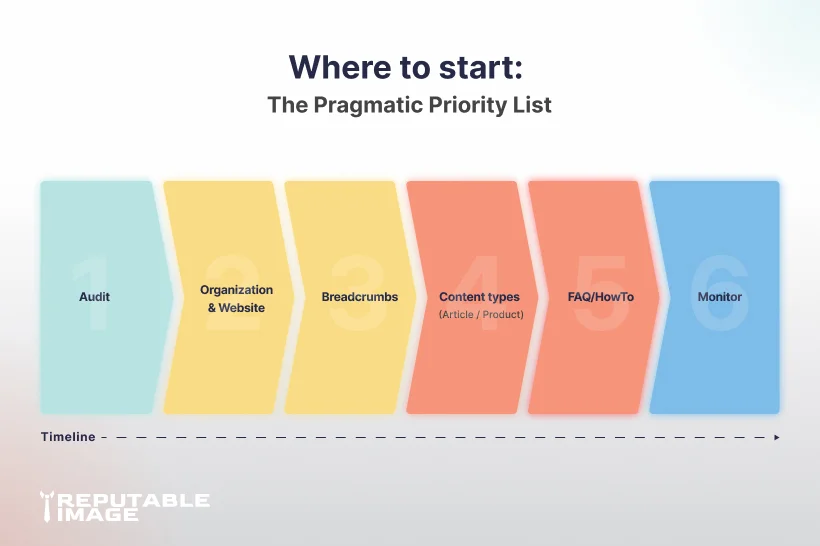
Add an Organization block on your homepage with name, logo, contact details, and verified social links; this helps search engines associate content with your brand entity. A WebSite schema with a searchAction can make your site eligible for branded search features and structured site links. Keep these snippets accurate and updated — incorrect or stale links can harm trust and confuse knowledge graph generation. Treat the homepage JSON-LD as part of your site identity that should be reviewed when you change brand assets. (schema.org)
<script type="application/ld+json">
{
  "@context":"https://schema.org",
  "@type":"Organization",
  "name":"Reputable Image",
  "url":"https://www.reputableimage.com",
  "logo":"https://reputableimage.com/img/logo/reputable-image-logo.webp",
  "sameAs":[
    "https://www.facebook.com/ReputableImage",
    "https://www.instagram.com/reputable_image"
  ]
}
</script>
Replace [name], [url], [logo], and [sameAs]
BreadcrumbList markup is simple and pays dividends on category and product pages: it clarifies your site hierarchy to search engines and may appear directly in search results as a clickable path. Use correct positions and absolute URLs so the breadcrumb shown in search aligns with the navigation users see on the site. Breadcrumbs are particularly useful for large catalogs and multi-level blog structures where navigation clarity affects discovery and bounce rates. When you redesign sections, remember to update these snippets as your structure changes.
<script type="application/ld+json">
{
  "@context":"https://schema.org",
  "@type":"BreadcrumbList",
  "itemListElement":[
    {
      "@type":"ListItem",
      "position":1,
      "name":"Home",
      "item":"https://www.reputableimage.com"
    },
    {
      "@type":"ListItem",
      "position":2,
      "name":"Blog",
      "item":"https://www.reputableimage.com/blog"
    },
    {
      "@type":"ListItem",
      "position":3,
      "name":"Schema & Structured Data",
      "item":"https://www.reputableimage.com/blog/2026/schema-structured-data.html"
    }
  ]
}
</script>
For every article or blog post, include Article or BlogPosting markup with headline, datePublished, dateModified, author, mainEntityOfPage, and a representative image. This makes your content eligible for article-specific features, improves metadata extraction for social previews, and helps with content attribution in knowledge panels. Always ensure image URLs and author details appear on the page; duplicating metadata in markup that doesn’t match the visible content can generate warnings. Regularly check Search Console after publishing to catch and fix issues quickly.
<script type="application/ld+json">
{
  "@context":"https://schema.org",
  "@type":"FAQPage",
  "mainEntity":[
    {
      "@type":"Question",
      "name":"Do I need schema for my small business website?",
      "acceptedAnswer":{
          "@type":"Answer",
          "text":"Yes — at minimum add Organization and WebSite schema;
          then add page-specific types like Article, Product, or FAQ
          where appropriate."
      }
    },
    {
      "@type":"Question",
      "name":"Will schema guarantee rich results?",
      "acceptedAnswer":{
          "@type":"Answer",
          "text":"No. Structured data increases eligibility but does not guarantee
          rich result display. Follow Google guidelines and test carefully."
      }
    }
  ]
}
</script>
If pages include FAQ sections or step-by-step instructions, FAQPage and HowTo markup can unlock expandable answers and step-by-step snippets directly in search results. Only add these where the questions and answers are visible on the page — don’t mark up content that’s gated, hidden in modals, or auto-generated without user visibility. When used correctly, these types can increase impressions and reduce user friction by surfacing immediate answers. Monitor whether the expanded snippets increase clicks or change downstream engagement and adjust usage accordingly.
<script type="application/ld+json">
{
  "@context":"https://schema.org",
  "@type":"FAQPage",
  "mainEntity":[
    {
      "@type":"Question",
      "name":"Do I need schema for my small business website?",
      "acceptedAnswer":{
        "@type":"Answer",
        "text":"Yes — at minimum add Organization and WebSite schema;
        then add page-specific types like Article, Product,
        or FAQ where appropriate."
      }
    },
    {
      "@type":"Question",
      "name":"Will schema guarantee rich results?",
      "acceptedAnswer":{
        "@type":"Answer",
        "text":"No. Structured data increases eligibility but does not
        guarantee rich result display. Follow Google guidelines
        and test carefully."
      }
    }
  ]
}
</script>
Product, Offer, and AggregateRating markup control which product info (price, availability, ratings) can appear in search results and price-comparison features. Accurate pricing and stock data are essential; failures to keep Offer values current can result in manual actions or dropped snippets. Consider programmatic generation of these snippets from your CMS or e-commerce platform to ensure synchronization and reduce human error. If your site hosts reviews, ensure moderation and provenance policies are robust so AggregateRating reflects real user feedback.
Service-area and brick-and-mortar businesses should implement LocalBusiness schema with structured address, openingHours, geo coordinates, and contact details to strengthen local search signals and improve matching to Google Business Profiles. Events benefit from Event schema that includes date, time, location, and ticketing offers; this can surface events in event-rich results and calendar integrations. Keep these types under governance, as outdated hours or canceled events are worse than no markup at all. Automate updates where possible and ensure canceled or postponed events are reflected immediately. For local SEO tactics that pair well with LocalBusiness markup, see Local SEO for Denver Small Businesses.
A practical rollout checklist: identify the page types you’ll mark up, write JSON-LD that reflects visible page content, deploy to staging, run the Rich Results Test and Schema.org validator, then monitor Search Console for errors. Use version-controlled snippets and include schema validation in your CI/CD pipeline to prevent regressions and accidental removals. Keep change logs for schema updates so teams can trace when a markup change correlated with a shift in impressions or CTR. Consider incremental rollout by site section to track impact and reduce blast radius.
Start by adding schema to your highest-traffic and conversion-focused pages: homepage, top blog posts, and best-selling product pages. These placements usually show measurable uplifts in impressions and CTR and provide data to prioritize broader rollouts. Use those early wins to build a business case and to refine the style guide for property choices and formatting.
Common pitfalls include marking up hidden or gated content, using mismatched values (wrong dates or prices), and applying FAQ markup to auto-generated or irrelevant Q&A. Establish a lightweight schema style guide that lists approved types, required properties, and ownership for each snippet and include examples for editors and developers. Train content teams to avoid adding schema for content that isn’t visible and schedule quarterly schema audits as part of content maintenance. A small governance routine prevents noisy errors and preserves the SEO upside.
Measure success by tracking impressions, clicks, and appearances of rich results in Google Search Console and correlate those metrics with CTR and conversions. Use A/B testing where possible: deploy schema to a sample of pages and compare performance to a control group to isolate the effect of markup. Remember schema makes content eligible for features — it is one of many signals — and usually works best when combined with strong content and technical SEO. If you’d like, we can run a lightweight audit to identify the highest-impact snippets on your site and provide a prioritized rollout plan. To learn how analytics ties into measuring schema-driven changes, see Using Analytics to Improve UX.
Keep a content library with copy-and-paste JSON-LD examples for Organization and BlogPosting so developers and editors can deploy safe snippets. List your team’s validator links (Rich Results Test, Schema.org, Google Search Central) in the wiki and build a template generator to populate values from your CMS. For dynamic sites, generate JSON-LD server-side or via a template engine so values stay current and centralized.
Start with Organization, Breadcrumb List, and Article/BlogPosting, then add FAQ, Product, Local Business, and Event as your content needs evolve. Schema is a low-effort, high-potential opportunity: implement carefully, test, and measure so structured data can help your business win more visibility.
Implementing the right schema can unlock richer search appearances and measurably improve visibility and click-through rates for your most important pages. We can audit your site, implement clean JSON-LD snippets, validate them in staging, and add monitoring so your structured data stays accurate and effective. Our approach is practical and low-risk: we prioritize high-impact pages first, automate snippet generation where possible, and document governance so your team stays in control. Ready to get started? Click the button below to call us for a free consultation and we’ll walk you through a prioritized rollout plan.
Sources:
1. Google Policy at Google Search Central - "General structured data guidelines"
https://developers.google.com/search/docs/appearance/structured-data/sd-policies
2. Schema.org - "FAQPage"
https://schema.org/FAQPage
3. Rob Timmermann at Timmermann Group - "Schema Markup: The Complete Guide 2026"
https://www.wearetg.com/blog/schema-markup
