

Customer reviews are social proof in action: they build trust, drive conversions, and feed local and product search signals. For small businesses, a steady stream of authentic reviews can mean the difference between appearing in a local pack or getting buried. This guide shows repeatable ways to get more customer reviews—scripts you can copy, best-practice timing, incentive rules, and how to display reviews so they deliver maximum value.
Before asking for reviews, make sure your operations are review-worthy: accurate hours, fast responses, clear returns, and an easy purchase or service experience. Customers are more likely to leave positive feedback when expectations are met or exceeded. Also prepare a centralized place to collect review links (Google, Yelp, product pages) and a small process doc your team can follow.
Not all platforms are equal for every business. Local services benefit most from Google Business Profile and industry-specific sites; e-commerce sellers should prioritize product page reviews plus a profile on a marketplace; B2B companies may favor LinkedIn recommendations and G2/Capterra. Concentrate your ask on 1–2 primary platforms to avoid diluting effort and to build visible, timely momentum.
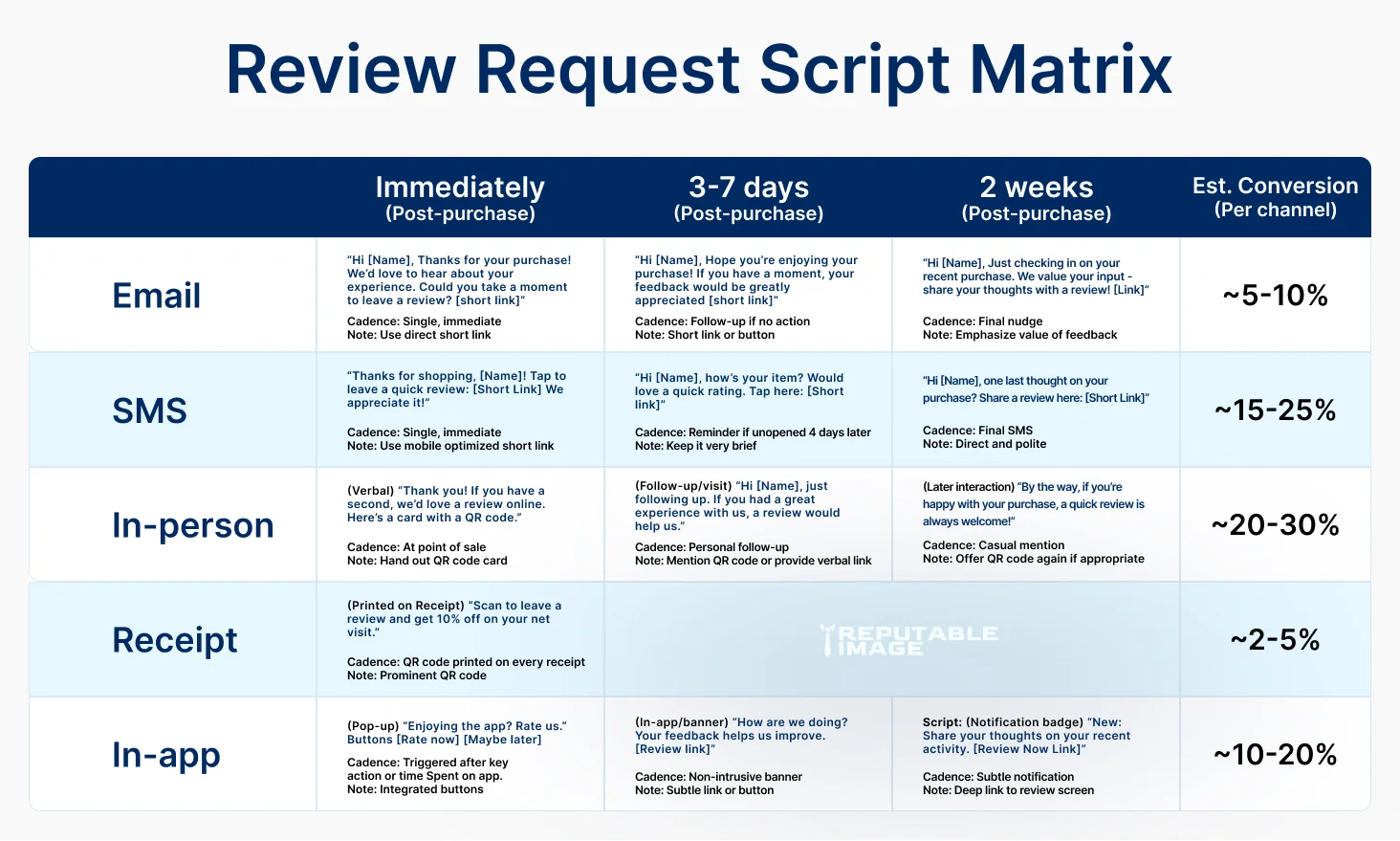
Ask while the experience is fresh: after delivery, a completed service, or a successful onboarding milestone. For physical products, a 3–7 day post-delivery window balances time for use and recall; for services, ask right after a positive interaction or milestone. Automated reminders help, but always space them (initial ask → friendly reminder → final reminder) and avoid spamming.
Use short, personal, and specific language that asks for a review and shows appreciation.
“Hi [Name], thanks for your order — we hope you love your [product]. If it’s working well for you, could you share a quick review on [Platform link]? It helps small businesses like ours a lot. Thanks so much — [Your Name/Team].”
“Hi [Name] — glad your [service/product] is done. Could you tap here to leave a 1-minute review? [short link] Thanks! — [Brand]”
“Thanks for stopping by! If you enjoyed your visit, a quick review on Google helps small businesses like ours — here’s a QR code.”
For higher-impact asks (e.g., a five-star follow-up) include mention of one thing you hope they’ll highlight — this nudges specificity and usefulness for future customers.
Encourage reviewers to mention what they valued: speed, friendliness, durability, or ROI. Prompted specifics create richer reviews that answer buyer questions and help SEO if keywords naturally appear. Example prompt: “Would you mind mentioning what you liked most — delivery speed or product quality?”
Incentives can increase volume but must be used carefully. Never pay for five-star reviews or require positive wording — that breaches platform rules. A safe approach is to offer entry into a monthly drawing or small discounts for any review (positive or negative) while clearly stating it’s a thank-you for honest feedback. Check platform policies (Google, Yelp, Amazon) and local laws before rolling out incentive programs.
Use order/status triggers in your ecommerce or CRM to send review requests automatically, but personalize messages with the customer’s name and product/service name. Use short tracking links that go directly to the review form to reduce friction. Keep the automation cadence conservative to avoid feeling spammy.
Treat negative reviews as opportunities — respond within 24–48 hours, acknowledge the issue, and offer a path to resolution offline (phone, email). Publicly showing attempts to resolve problems demonstrates credibility and can convert unhappy customers into advocates. If a review is abusive or fake, follow the platform’s dispute or removal process, and document your attempts.
Display recent and diverse reviews prominently: product pages, homepage testimonial sections, and schema-rich snippets for search. Use short quote cards for social proof in ads and email. Consider adding a rotating “recent reviews” feed to your homepage to show freshness, and use structured data (Review schema) to increase the chance of rich snippets in search results. For tactics on using reviews to boost product page conversions, see E-commerce & Conversion.
Track volume, average rating, review velocity (reviews per month), platform distribution, and sentiment. Measure downstream metrics: conversion lift on pages with reviews, click-through on local listings, and search visibility improvements. Use a small dashboard to link review activities to revenue metrics over time. To connect review metrics to UX and funnels, see Using Analytics to Improve UX.
Identify delighted customers (NPS, 9–10 scores) and invite them to special advocate programs where they’re first to try new products and occasionally asked for feedback. Make it easy for advocates to share their reviews and reward them with early access or small perks—not for positive reviews but for ongoing engagement.
Keep this SOP in a shared doc so any teammate can run the program
Consistent, authentic customer reviews compound: they improve trust, help SEO, and lift conversions while giving you signals to improve operations. With the scripts, timing guidelines, and checklist above, small teams can build a review engine without heavy overhead.
If you’d like, we can audit your current review footprint, set up automated review flows, and design review displays and schema that improve search visibility and conversions. Click the button below to get in touch and we’ll build a prioritized review growth plan for your business.
