
A brand style guide turns visual ideas into repeatable rules so your brand looks and sounds consistent everywhere. For small businesses, consistency builds trust faster than frequent redesigns — customers recognize the brand and feel confident engaging. A lean, practical style guide saves time for designers, partners, and contractors by answering the recurring “which font/color/logo should I use?” questions once and for all.
A useful guide covers the logo system, color system, typography, tone of voice, imagery, layout rules, and file usage. Don’t over-engineer it: prioritize what your team actually needs (logo files, primary colors, web fonts, image rules, and copy examples). Start small and expand the guide as you grow.
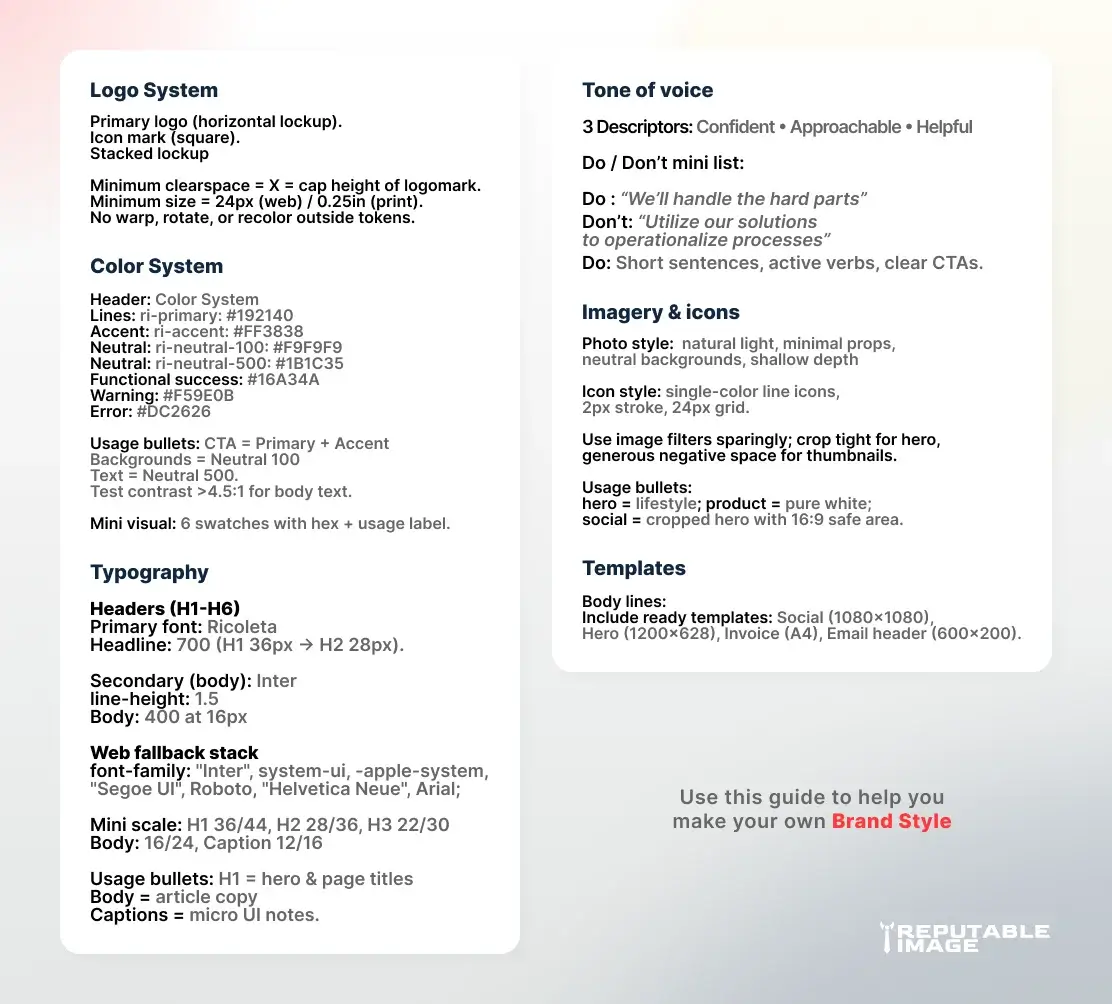
Document the primary logo, stacked lockup, icon-only mark, and compact lockups for social or tiny placements. Specify minimum size, clearspace (X = logomark height), and acceptable/forbidden treatments (no warping, no rotation). Provide downloadable SVG, EPS, and PNG variants so developers and printers can use the correct file immediately.
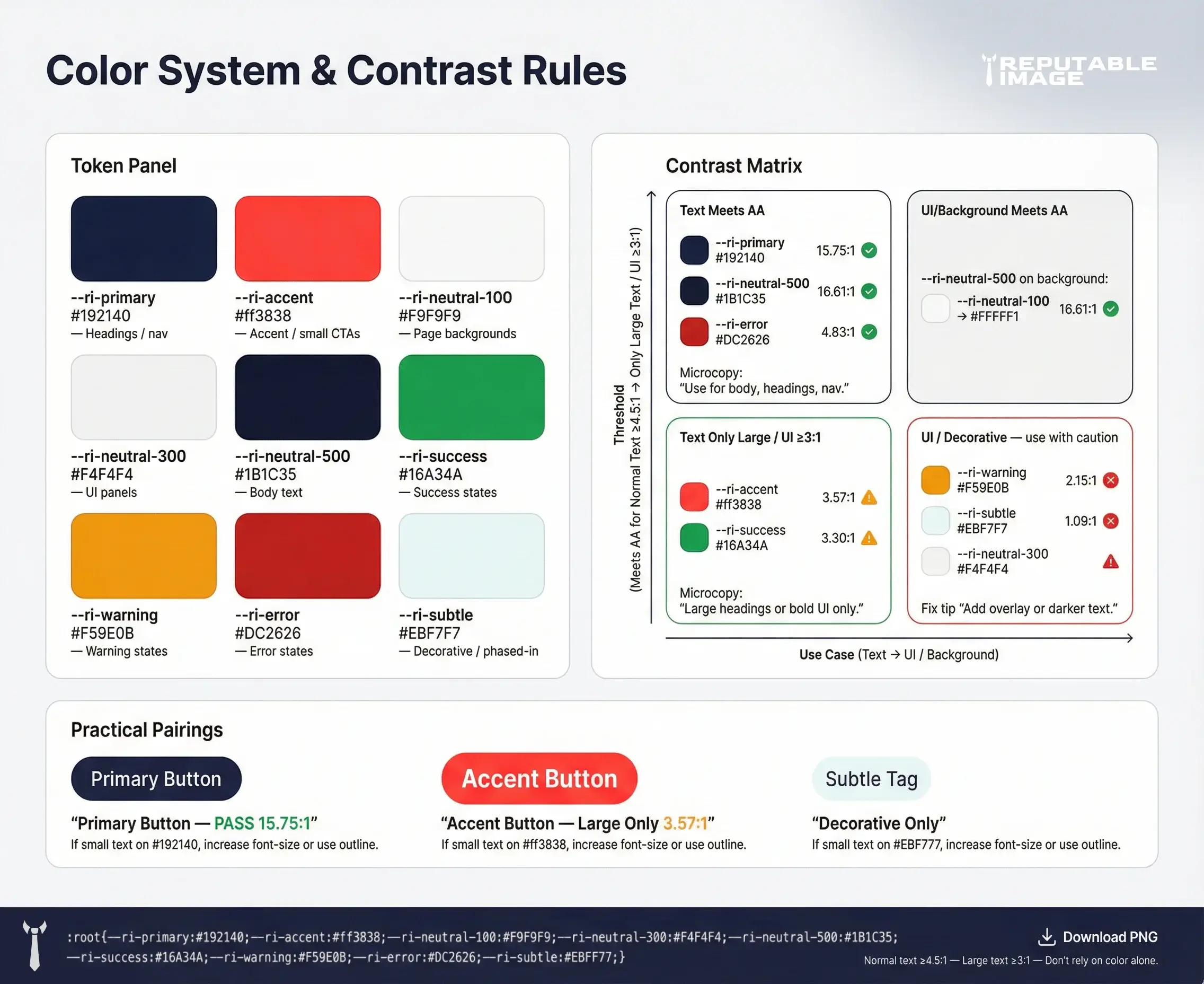
Move beyond 3 colors — build a color system: primary, secondary, neutrals, and functional colors (success, warning, error). Define color roles (e.g., Primary 500 for CTAs, Neutral 100 for backgrounds) and include hex, RGB, and accessible contrast pairs.
Add usage rules: where to use tints, where to use saturated shades, and when to default to neutrals for legibility.
Pick a primary brand font for headlines and a secondary for body text, and list exact weights and use-cases (H1 = Bold 700, Body = Regular 400). Include web-safe fallbacks and font-loading guidance (preload critical fonts and use font-display: swap). Provide a small typographic scale and examples of hierarchy so content looks consistent across pages and PDFs.
Define voice in 3 short adjectives (e.g., confident, friendly, helpful), then show 4–6 real examples: hero headline, product blurb, email subject, and a social caption. Keep a do/don’t list (e.g., Don’t: jargon; Do: short sentences with plain verbs). This helps copywriters and customer-facing teams match messaging instantly. For writing that converts and matches brand voice, see Copywriting Strategies for Small Business Websites.
Specify photographic style (high-contrast lifestyle, neutral backgrounds, or product-on-white), filters, and cropping rules. For icons, state whether to use line or filled icons, stroke weight, and when to use colored icons versus single-color icons. Provide ready-to-use guidelines for social, hero, and thumbnail images.
Set a basic grid (e.g., 12-column for web, 8pt spacing system for UI) and rules for margins, gutters, and alignment. Include component specs for cards, CTAs, and hero blocks so designers and developers implement consistent UI. Add simple CSS snippets for common components if your team includes front-end developers.
Document minimum contrast ratios for text, accessible color pairings, and focus indicators for interactive elements. Define clear rules for alt text, semantic headings, and how to present data visually without relying on color alone. Accessibility is a brand promise — consistency here protects both users and your reputation.
Ship a small starter kit: logo files (SVG, EPS, PNG), color tokens (JSON/CSS variables), font stack with links, a one-page PDF cheat sheet, and a few Figma components or Sketch symbols. Provide ready-to-edit templates for social posts, invoices, and one-off flyers to speed production and keep messaging tight. For practical logo export and scaling tips, see How To Design A Logo That Scales.
Announce the guide with a short walkthrough video and a single-page cheat sheet for non-designers. Add the guide to a central drive (or a docs site) and require new contractors to review it before work begins. Encourage feedback: treat the guide as a living document you update quarterly.
Schedule quarterly checks to add new components, update color tokens with production-tested values, and review tone examples against real customer responses. Track usage: which assets are downloaded most and which sections generate questions — those are signals to expand the guide.
Quick Checklist (Copy/Paste)
A brand style guide is the operational manual for your brand — it keeps visuals and voice consistent and makes your team more efficient. With a compact, clear guide, small businesses can deliver a professional, trustworthy experience without constantly reinventing the look and tone.
Reputable Image can create a tailored brand style guide, export the logo files, and deliver ready-to-use templates so your team stays consistent from web to social.
Sources:
1. Canva - "How to Create a Brand Style Guide"
https://www.canva.com/learn/your-brand-needs-a-visual-style-guide
