
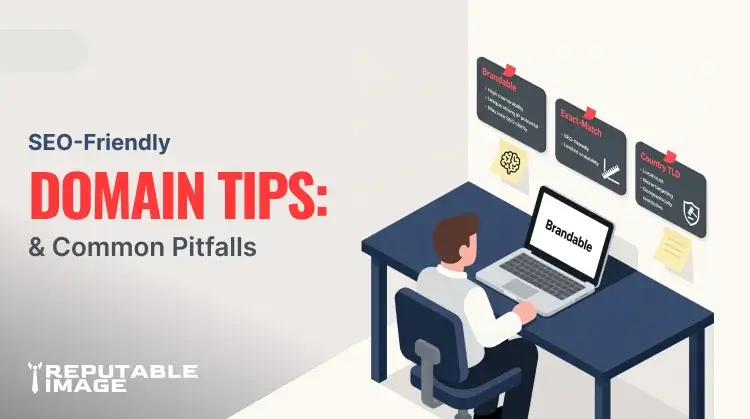
Choosing an SEO-friendly domain is one of those small decisions that can pay dividends for years. The domain you pick affects branding, memorability, email consistency, and — yes — how people and search engines perceive your site. Domain choices are not magic ranking hacks, but they impact click-through rates, direct traffic, and long-term brand equity when chosen well. Use this guide to avoid common pitfalls and choose a domain that helps your small business grow.
Domains are not the dominant SEO factor they once were, but they still matter for trust and branding. Google’s ranking systems treat domain wording as just one signal among many, and exact-match domains (EMDs) are no longer an automatic shortcut to high rankings. That means a domain that reads naturally and builds trust is usually a better long-term play than a keyword-stuffed option. (Google Search Central)
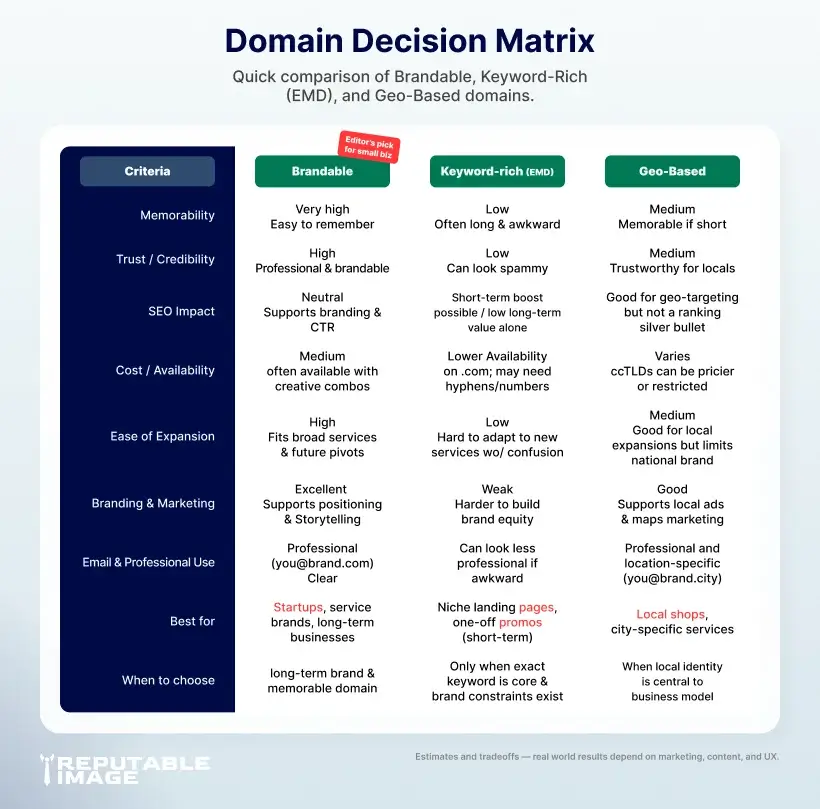
A brandable domain is short, memorable, and pronounceable — it’s how customers talk about you offline and find you again. Avoid long hyphenated strings and numeric substitutions that are hard to spell or say; they cost you word-of-mouth referrals. If a keyword is helpful, use it sparingly (for example in a subdomain or page title), but prioritize a domain that supports a strong brand identity and clear voice. (Moz)
Shorter domains are easier to remember and less likely to be mistyped, which matters for direct traffic and marketing materials. Aim for a domain under 15 characters if possible, and test it by speaking it aloud — if you have to spell it out, it’s probably too complicated. Also check for potential misreadings or unfortunate letter groupings that change meaning when typed quickly. (NameCheap)
The domain extension (.com, .net, country TLDs) rarely changes rankings by itself, but it affects user trust and regional targeting. A .com remains the default expectation for many customers, while country-code TLDs (like .co.uk or .ca) help with geo-targeting. Newer generic TLDs (.shop, .studio) can work for branding but may require more marketing to build the same trust level. (NameCheap)
EMDs used to provide an easy SEO boost, but search engines now detect low-quality keyword-stuffed domains and downweight them. That said, an EMD that also represents a legitimate brand and publishes high-quality content can still perform well — the warning is only against using an EMD as a substitute for good content and UX. Focus on product-market fit and user experience first; the domain is a supporting actor. (Moz)
Always check trademark databases and existing brands before registering a domain. Choosing a name too close to an established brand can lead to cease-and-desist letters and forced transfers — an expensive and reputation-risky outcome for a small business. If you find a name in use, tweak it or pick something original; it’s cheaper to rebrand early than fight over a domain later.
Think beyond the launch: will your domain still make sense if you expand services or open new locations? If you plan to rebrand later, map a redirect strategy and budget for migration. Proper 301 redirects and canonical tags preserve most SEO value during a domain move, but the process still requires technical care to avoid traffic loss — plan migrations carefully and monitor performance post-launch. For migration help see How to Choose the Best Hosting for Small Businesses (Moz)
If your business serves a local area exclusively, consider a local TLD (e.g., .ca) or include your city in the domain only if it aligns with your brand. Often it’s better to use a brandable domain and rely on local SEO (NAP listings, Google Business Profile) for geo-targeting rather than stuffing the domain with a city name. Local targeting strategies live in many places — integrate your domain choice with your local SEO plan for maximum effect. See our local SEO guide for step-by-step local tactics. Local SEO For Denver Small Businesses.
Don’t use hyphens, long numeric sequences, or intentional misspellings to get an available .com — those patterns reduce memorability and trust. Avoid choosing a domain solely because a keyword is available; if your brand doesn’t match, users will bounce. Finally, don’t forget email: company email like you@yourdomain.com signals professionalism — make sure the domain works well for email and identity.
Register domains with reputable registrars and enable WHOIS privacy if you don’t want your address public. Use two-factor authentication on your registrar account and lock the domain to prevent unauthorized transfers. Make sure DNS management is accessible and document your settings (A records, MX, TXT for verification) so migrations and DNS troubleshootings are simpler later.
A well-chosen domain is an asset that supports your brand, marketing, and long-term discoverability. Investing the few extra hours to choose a clear, memorable, and legally safe domain saves time and money later, and reduces friction when you market or scale the business.
If you’d rather not guess, Reputable Image can audit name options, check trademarks, confirm available social handles, and handle the registration and migration so your site launches cleanly and confidently.
Sources:
1. Rand Fishkin at Moz - "How to Choose a Domain Name"
https://moz.com/blog/how-to-choose-a-domain-name-whiteboard-friday
2. Saket Aggarwal at NameCheap - "Choosing and checking domains for better SEO"
https://www.namecheap.com/blog/choosing-and-checking-domains-for-better-seo
3. Andrew Allemann at NameCheap - "Can a Domain Name Boost SEO Rankings?"
https://www.namecheap.com/blog/domain-name-boost-seo
4. Chima Mmmeje at Moz - "Domain Types: Definition, Examples & How To Use Them"
https://moz.com/learn/seo/domain
5. Google Search Central - "A guide to Google Search ranking systems"
https://developers.google.com/search/docs/appearance/ranking-systems-guide
