

Choosing the best hosting for small businesses is one of the most practical decisions you’ll make for your website. Hosting affects site speed, uptime, security, and how much time you’ll spend on maintenance—factors that directly influence conversions and customer trust. Picking the right plan now can save money and headaches later, while the wrong pick often leads to performance problems and migration costs.
There are three hosting patterns most small businesses choose from: shared hosting, managed hosting (often managed WordPress for WP sites), and VPS/cloud hosting. Each type balances cost, performance, and support differently, so the “best” pick depends on traffic, technical skills, and growth plans. Industry guides break these options down similarly and recommend choices based on site scale and technical comfort. (WPBeginner)
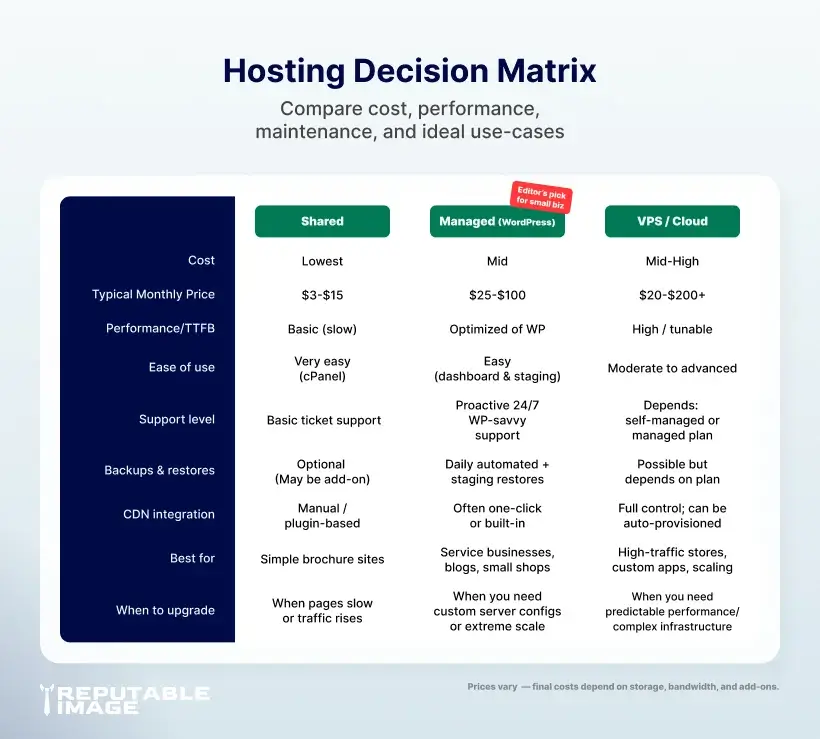
Shared hosting is the lowest-cost option because multiple sites share one server’s resources. It’s easy to set up and usually includes a simple control panel, making it a common starting point for brochure sites and early-stage businesses. The tradeoff is limited performance under traffic spikes, and “noisy neighbor” sites on the same server can affect speed and reliability.
Managed hosting (especially managed WordPress) bundles hosting with proactive maintenance like automated updates, malware scanning, staging sites, and backups. That hands-off approach reduces technical overhead and is ideal for owners who want reliable performance without daily server management. Managed plans typically cost more than shared hosting but can save developer time and reduce downtime risk. (Hubspot)
VPS (Virtual Private Server) or cloud hosting gives each account dedicated resources and greater control over server configuration. This option is suitable when you need performance, custom software, or predictable scaling; it’s often chosen by stores, membership sites, and applications that outgrow shared plans. VPS can be self-managed or offered as managed VPS; expect higher costs and occasionally a need for sysadmin help. (TechRadar)
When you compare hosts, start with uptime and SLA guarantees—your business can’t afford frequent outages. Look for automated backups with an off-site copy, and verify restore testing is possible; a backup that hasn’t been tested is a false comfort. Performance considerations include server hardware, HTTP/2 or HTTP/3 support, and whether the host makes CDN integration easy.
Security matters beyond SSL: choose hosts that offer firewall/WAF options, malware scanning, and DDoS mitigation. If your site accepts payments or stores user data, PCI compliance or secure payment handling options also matter. Finally, support quality and response times are crucial—24/7 support with WordPress expertise is a big timesaver for non-technical owners. (Hubspot)
Hosting drives Time To First Byte (TTFB) and can materially affect Core Web Vitals like LCP and INP, which Google uses to evaluate page experience. Faster hosting and edge delivery reduce load times for users and help with rankings and conversions. Measure LCP and other vitals with field data (CrUX) and lab tools (Lighthouse) to set a performance budget and watch for regressions after changes. (Google for Developers) For step-by-step performance fixes, see Site Speed Checklist: Images, Caching & CDN
Pairing your host with a CDN improves speed and reliability by serving assets from edge nodes closer to users, and it can add DDoS protection and caching benefits. For many small businesses with remote customers or social traffic spikes, a CDN is a cost-effective way to boost perceived speed without expensive origin upgrades. Cloudflare and other CDN providers document these benefits and simple integration patterns. (Cloudflare)
Before switching hosts, take a full backup and snapshot analytics so you can compare post-migration performance. Use a staging environment to test the entire site—forms, payment flows, search, and links—then reduce DNS TTL for a quick cutover window. After migration, test from multiple regions and validate UX and analytics events, then monitor logs and Core Web Vitals for at least two weeks.
Don’t buy hosting purely on sticker price—consider total cost of ownership: management time, support, backup/restore frequency, CDN fees, and migration costs. A slightly higher monthly fee for managed plans often pays for itself by avoiding emergency developer time and reducing downtime risk. Need repeatable maintenance routines? See Regular Maintenance for Small Business Sites
Choosing the right hosting reduces friction for website visitors, prevents avoidable outages, and gives you headroom to grow without a costly emergency migration. Over time, reliable hosting paired with CDN and solid maintenance improves SEO, conversion rates, and customer trust.
If you’d like, Reputable Image can audit your current setup, recommend the best hosting tier, and run the migration (with staged testing and performance tuning) so you don’t lose traffic or search equity.
Sources:
1. Syed Balkhi at WPBeginner - "Shared Hosting vs. Cloud Hosting vs. Managed WordPress – What’s the Difference?"
https://www.wpbeginner.com/opinion/shared-hosting-vs-cloud-hosting-vs-managed-wordpress
2. Amy Rigby at HubSpot - "Best Web Hosting for Small Business Sites: 9 Favorites"
https://blog.hubspot.com/website/best-web-hosting-for-small-business
3. James Capell at TechRadar - "Best managed VPS hosting"
https://www.techradar.com/pro/website-hosting/best-managed-vps-hosting
4. Google for Developers - "Understanding Core Web Vitals and Google search results"
https://developers.google.com/search/docs/appearance/core-web-vitals
5. Cloudflare - "CDN benefits: Why use a CDN?"
https://www.cloudflare.com/learning/cdn/cdn-benefits
