
Pillar pages are long-form hub pages that organize a whole topic and link to supporting cluster articles. They help search engines and users understand your topical authority while improving internal navigation. Building pillar pages intentionally makes content creation scalable and measurable — a practical route to consistent organic growth. (Conductor)
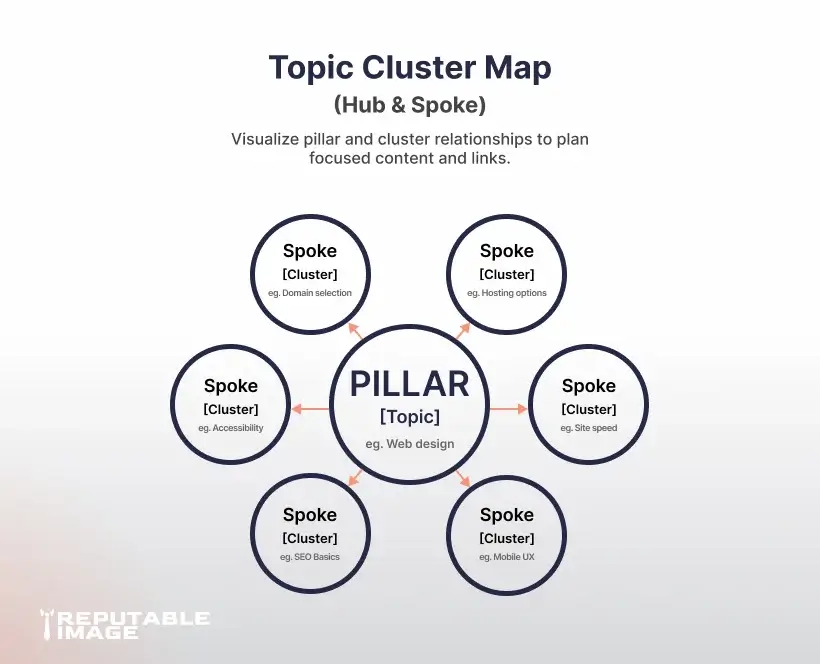
A pillar page is a comprehensive overview of a broad topic that links to deeper, more focused cluster pages. Think of it as the hub in a hub-and-spoke model: the pillar gives breadth and the clusters provide depth. This structure signals to search engines that your site covers a topic thoroughly and helps users find the next step in their journey. (Conductor)
Pillar pages improve site architecture by concentrating internal links around a central hub, which lowers content fragmentation and increases topical relevance. They also create better user journeys — visitors can land on the pillar for an overview and then follow cluster links to detailed answers. When executed well, pillar strategies increase discoverability and reduce reliance on single-keyword pages. (Conductor)
Start with broad themes that align with your services and customer questions, not every keyword under the sun. Use analytics to identify topics with meaningful traffic potential and gaps in competitor content. Prioritize topics that map to your offerings and buyer stages so pillar pages also support conversions. (HawkSEM)
A strong pillar page typically includes a clear H1 that defines the topic, a short intro that sets expectations, an organized table of contents, summary sections for each subtopic, and prominent internal links to cluster pages. Add visuals, CTAs, and examples to break up long text and improve scannability. Keep the pillar broad enough to cover the topic but use cluster links to avoid bloating the page. (HubSpot)
For each pillar, map 8–15 supporting cluster topics — narrow questions, how-tos, or case studies — that answer specific search intents. Use keyword research to validate demand for each cluster and to identify the primary and secondary terms to target in titles and headers. The pillar should link to clusters using descriptive anchor text so the intent passed to search engines is clear. (Conductor)
Write the pillar page primarily for people: clear headings, short sections, and quick answers with links to deeper reads. Optimize for SEO by including the primary topic in the title, H1, URL, and first paragraph, but avoid keyword stuffing. Use schema where appropriate (FAQ, HowTo) to increase SERP presence and improve click-through rates. (HubSpot)
Include a table of contents at the top that links to on-page anchors — this improves UX and helps search engines crawl the structure. Use consistent H2/H3 patterns so clusters are easy to parse programmatically and visually. Consider sticky nav for long pillars and keep paragraphs short and skimmable for busy readers. (HawkSEM) For examples of structured content and UX, see UI/UX Best Practices.
Every cluster page should link back to its pillar with a contextual sentence and a CTA; the pillar should link to each cluster with clear anchor text. Avoid orphaned cluster pages — if a page isn’t linked from a pillar, it loses topical context. Use the pillar as the canonical hub for the topic and track inbound internal links in your content map. for example, this is an internal link: Learn how to improve content flow and layout in our guide: UI/UX Best Practices.
Design pillar CTAs that match intent: educational CTAs (download checklist) for top-of-funnel readers and product/service CTAs (book a consult) for intent-driven visitors. Place at least one primary CTA above the fold and one contextual CTA near cluster links. Track CTA performance separately to measure pillar-driven conversions.
Promote pillar pages through newsletters, social posts, and outreach to industry sites that may reference your comprehensive resource. Pillars are linkable assets — if you include unique data, case studies, or tools, they’re far more likely to attract backlinks. Plan a distribution calendar post-launch to give the pillar an initial traffic and link boost.
Track organic traffic, clickthrough rate, time on page, and cluster link CTRs to see how the pillar performs. Use rankings and impressions for primary and related keywords to measure topical authority gains. Iterate quarterly: refresh clusters, add new FAQs, and update internal links as you expand the topic. For analytics-driven UX improvements that pair well with pillars, see Analytics Improve UX.
Pillar Page Launch Checklist (Copy/Paste)
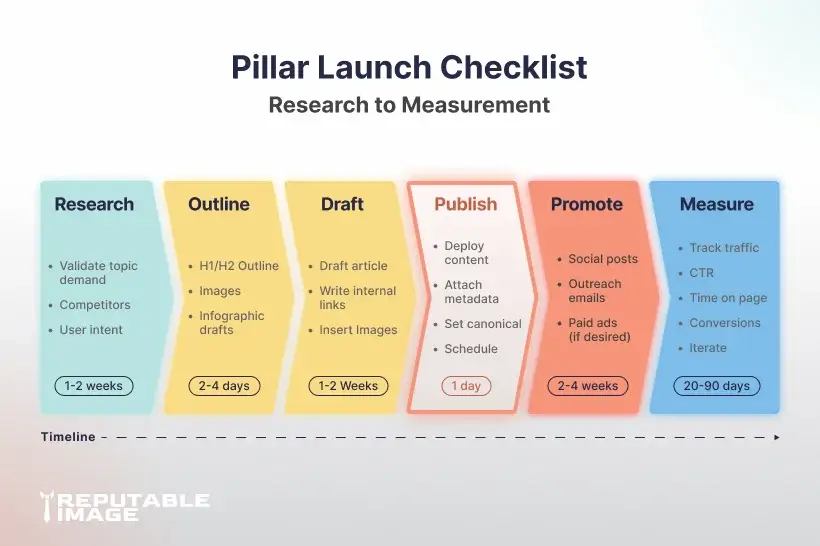
Pillar pages are an investment in structure and discoverability that pay out over months and years by concentrating authority around topics you own. With a repeatable process — research, map, build, link, promote, measure — you make content work strategically rather than reactively.
If you’d like, Reputable Image can plan your pillar topics, build the pillar and clusters, and manage promotion so you get measurable organic wins without the guesswork.
Sources:
1. Shannon Vize et al. at Conductor - "Topic Clusters and Pillar Pages: What They Are & Why They Matter [Free Template]"
https://www.conductor.com/academy/topic-clusters
2. Christina Lyon at HawkSEM - "What Is a Pillar Page? How to Create One (+ Proven Examples)"
https://hawksem.com/blog/pillar-pages-content-marketing
3. HubSpot - "Topics, pillar pages, and subtopic keywords"
https://knowledge.hubspot.com/content-strategy/pillar-pages-topics-and-subtopics
